
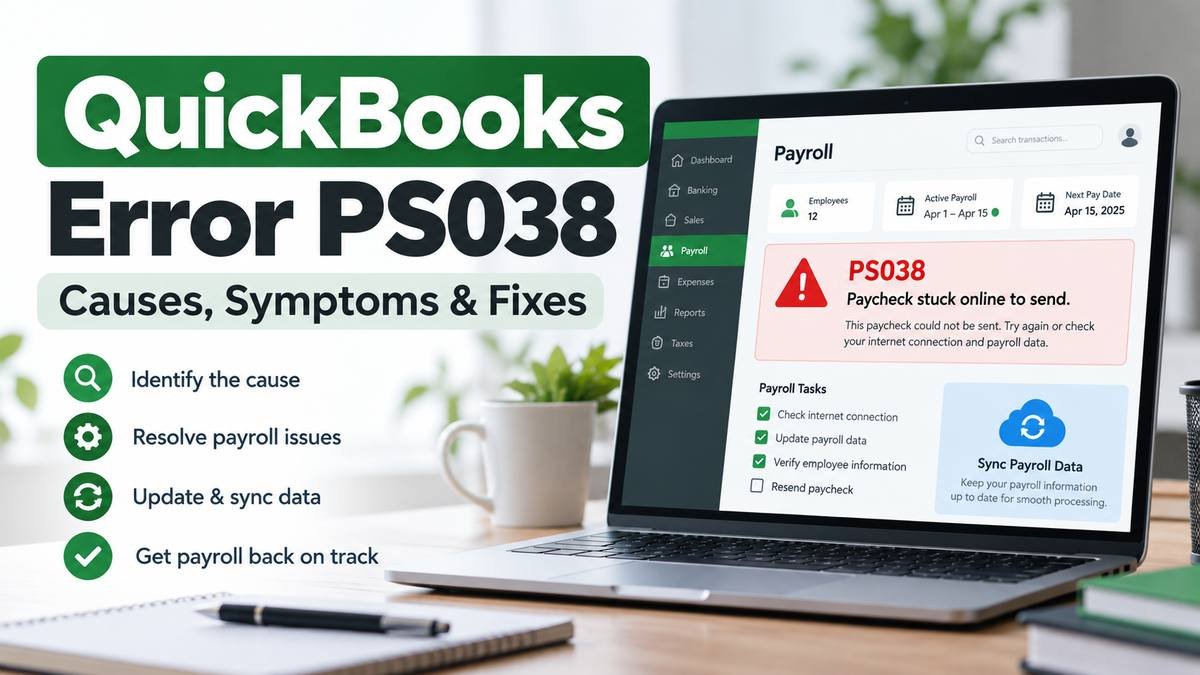
If payroll processing stops because one or more paychecks remain stuck with an “Online to Send” status, you may encounter QuickBooks Error PS038. The problem usually appears in QuickBooks Desktop Payroll while running payroll or downloading payroll tax table updates.
According to Intuit, PS038 occurs when paychecks remain stuck as “Online to Send.” These unsent transactions can prevent payroll from running correctly or stop QuickBooks Desktop from downloading updated tax tables.
The good news is that the issue can often be corrected by syncing payroll data, finding the affected paychecks, checking the company file with Verify and Rebuild, and, when required, resetting the status of individual stuck paychecks.
This guide explains what PS038 means, why it appears, how to identify affected transactions, and how to fix QuickBooks Error PS038 step by step without immediately making unnecessary changes to your payroll records.
What Is QuickBooks Error PS038?
QuickBooks Error PS038 is a QuickBooks Desktop Payroll error associated with paychecks that remain marked as “Online to Send.” When those payroll transactions do not successfully sync, QuickBooks may prevent you from completing payroll-related tasks or downloading the latest payroll tax table.
Intuit’s current guidance recommends syncing payroll data first, identifying the stuck paychecks, running Verify and Rebuild, and then resetting individual stuck checks if the error continues.
Quick Summary of QuickBooks Error PS038
| Issue | Details |
|---|---|
| Error | QuickBooks Error PS038 |
| Common Trigger | One or more paychecks remain “Online to Send” |
| Usually Affects | QuickBooks Desktop Payroll |
| Common Symptom | Payroll or tax table updates do not complete |
| Main Cause | Payroll transactions have not successfully synced |
| Recommended First Step | Update QuickBooks, back up the company file, then send payroll or usage data |
| Advanced Step | Verify/Rebuild data and reset affected paychecks |
What Does QuickBooks Error PS038 Mean?
When you create payroll transactions in QuickBooks Desktop, certain payroll information may need to communicate with Intuit’s payroll services.
If a paycheck remains marked Online to Send, QuickBooks considers that transaction pending rather than completely transmitted.
One pending paycheck may not always be obvious during normal bookkeeping. However, when QuickBooks attempts another payroll-related action, such as obtaining updated tax table information, the unresolved transaction can become a problem.
This is why quickbooks payroll error ps038 may seem like an update error even though the underlying condition is often an unsent payroll transaction.
The objective is therefore not simply to reinstall QuickBooks or repeatedly download updates. You need to find and resolve the payroll transactions that are still waiting to be sent.
Common Symptoms of QuickBooks Error PS038
Users experiencing quickbooks ps038 error may notice one or more of the following:
- QuickBooks displays error code PS038.
- Payroll data does not send successfully.
- A paycheck remains marked “Online to Send.”
- Payroll updates fail to complete.
- The latest payroll tax table cannot be downloaded.
- QuickBooks continues showing the same payroll issue after another update attempt.
- Payroll processing becomes interrupted because unresolved checks remain in the company file.
The strongest indicator is usually a QuickBooks paycheck stuck Online to Send, because Intuit specifically identifies this condition as the reason PS038 occurs.
Why Does QuickBooks Error PS038 Occur?
The direct cause of PS038 is generally one or more payroll checks remaining in the “Online to Send” state.
Several conditions can contribute to that situation.
Unsent payroll transactions
A paycheck may still be waiting to synchronize with Intuit’s payroll service. Until the transaction is successfully transmitted or its status is corrected, PS038 may continue appearing.
Payroll data did not sync successfully
If the Send Payroll Data or Send Usage Data process was not completed successfully, pending transactions may remain inside the company file.
Company file data needs verification
In some cases, the affected payroll transaction may be associated with a company-file data issue. QuickBooks includes Verify Data and Rebuild Data utilities to identify and repair common data-integrity problems.
QuickBooks Desktop is not up to date
Using an outdated maintenance release can complicate troubleshooting. Intuit recommends updating QuickBooks Desktop before working through its PS038 procedure.
A stuck paycheck needs to be manually reset
If syncing and rebuilding the company file do not remove the error, Intuit’s PS038 procedure includes manually editing and resetting each stuck paycheck to force QuickBooks to update its status.
Before You Start Troubleshooting
Before changing payroll transactions, prepare QuickBooks carefully.
Update QuickBooks Desktop
For QuickBooks Desktop for Windows:
- Open QuickBooks Desktop.
- Select Help.
- Select Update QuickBooks Desktop.
- Open the Update Now tab.
- Select Get Updates.
- Restart QuickBooks after the download finishes.
- Select Install Now if prompted.
These steps match Intuit’s current QuickBooks Desktop update procedure.
Create a company file backup
Always create a recent backup before using Rebuild Data or editing older payroll transactions.
In QuickBooks Desktop, you can go to:
File > Back up Company > Create Local Backup
A QuickBooks backup provides a recovery point if you later need to restore your company data.
Have your payroll PIN available
You may need your payroll service PIN when sending payroll data.
Confirm you can connect to Intuit
QuickBooks needs to communicate with Intuit’s servers to synchronize the pending payroll information.
How to Fix QuickBooks Error PS038
The safest approach is to work from the simplest solution toward the more involved payroll-data steps.
Method 1: Update QuickBooks Desktop
Start by installing the most recent maintenance release available for your supported QuickBooks Desktop version.
- Open QuickBooks.
- Select Help > Update QuickBooks Desktop.
- Select Update Now.
- Choose Get Updates.
- Restart QuickBooks.
- Install the update if QuickBooks asks you to do so.
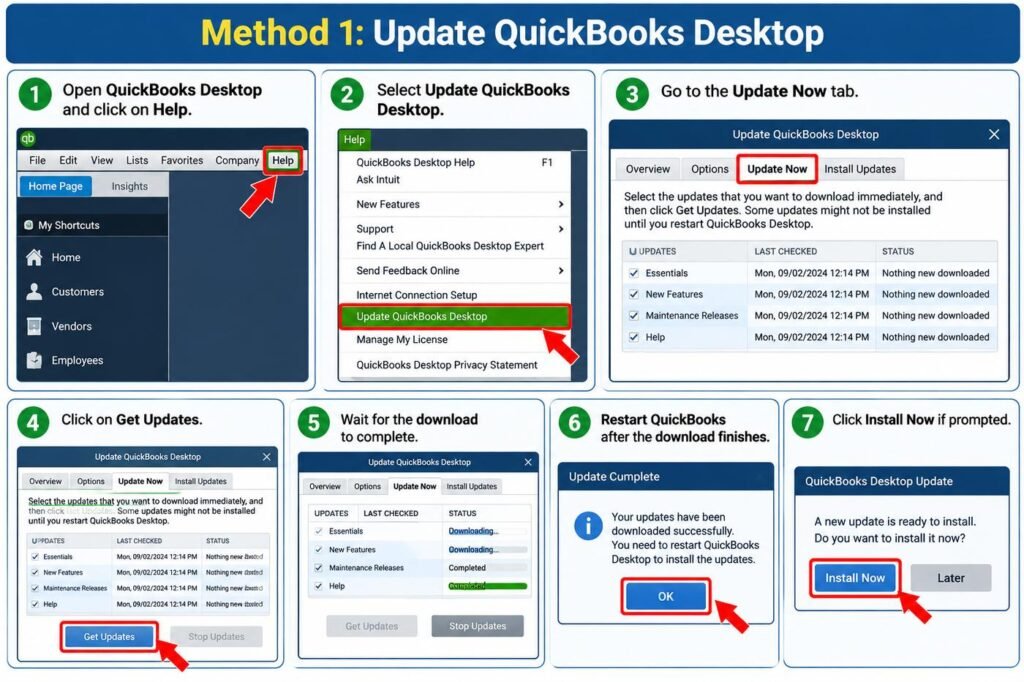
Why this may help: Keeping QuickBooks updated ensures you have current product fixes and improvements before troubleshooting the company file or payroll transactions.
After updating, reopen your company file and check whether payroll functions normally.
Method 2: Send Payroll or Usage Data Again
Next, try syncing the pending payroll information.
- Open your QuickBooks Desktop company file.
- Go to Employees.
- Select My Payroll Service.
- Choose Send Usage Data or Send Payroll Data, depending on the option available in your version.
- In the Send/Receive Payroll Data window, select Send All.
- Enter your payroll service PIN if requested.
- Allow the transmission to finish.
If it succeeds, try downloading payroll updates again.
Intuit lists this synchronization step before the more advanced PS038 repair process.
Method 3: Identify Paychecks Stuck as “Online to Send”
If the problem continues, identify the paychecks that QuickBooks still considers unsent.
- Go to Edit.
- Select Find.
- Open the Advanced tab.
- Under Choose Filter, select Detail Level.
- Choose Summary Only.
- Return to the Filter list.
- Select Online Status.
- Choose Online to Send.
- Select Find.
QuickBooks should now display the payroll transactions that have not been sent.
Write down or otherwise note:
- The oldest affected paycheck.
- The employee involved.
- The paycheck date.
- The number of matches displayed.
Do not randomly delete these transactions. They are payroll records and should be handled carefully.
This search process is specifically recommended in Intuit’s PS038 procedure.
Method 4: Verify and Rebuild QuickBooks Data
After locating the affected paychecks, check the integrity of your company file.
Run Verify Data
- Select Window > Close All.
- Go to File.
- Select Utilities.
- Choose Verify Data.
QuickBooks will scan the company file.
If QuickBooks says it detected no problems, continue with the next troubleshooting step.
If it reports that your data has lost integrity, run Rebuild Data.
Run Rebuild Data
- Go to File > Utilities.
- Select Rebuild Data.
- Follow the prompt to create a backup.
- Choose where the backup should be saved.
- Allow QuickBooks to rebuild the file.
- Wait for the rebuild-completed message.
Afterward, run Verify Data again.
Intuit explains that Verify identifies common company-file problems while Rebuild repairs data-integrity issues. A backup is required as part of the rebuild process.
Now attempt the payroll update again.
Method 5: Reset the Stuck Paychecks
If PS038 remains after syncing and rebuilding, the affected paychecks may need to be reset.
This is a more sensitive step because it involves temporarily editing the paycheck.
For each stuck paycheck identified earlier:
- Open the affected paycheck.
- Select Paycheck Detail.
- Under Earnings, add the same earnings item that currently appears last in the list.
- If QuickBooks displays a Net Pay Locked message, choose No.
- Confirm that the tax amounts and net pay have not changed.
- Select OK.
- If a Past Transaction message appears, select Yes.
- Save and close the paycheck.
- Reopen the same paycheck.
- Open Paycheck Detail again.
- Remove the duplicate earnings item you just added.
- Confirm again that the taxes and net pay are unchanged.
- Save the transaction.
Repeat the process only for paychecks that were identified as stuck.
Intuit explains that temporarily changing and then restoring the paycheck forces QuickBooks to refresh its status.
Important
Do not continue if the paycheck’s tax amounts or net pay unexpectedly change. Review the transaction before saving anything that would alter historical payroll figures.
Method 6: Download the Latest Payroll Tax Table
After resolving the stuck transactions, try downloading payroll updates again.
- Go to Employees.
- Select Get Payroll Updates.
- Select Download Entire Update.
- Select Update.
- Allow the download to finish.
QuickBooks Desktop Payroll requires an active payroll subscription to obtain current payroll tax tables. QuickBooks Online Payroll handles tax table updates automatically, so this procedure specifically applies to QuickBooks Desktop Payroll.
How to Find Paychecks Stuck as “Online to Send”
If you want to verify the problem before attempting advanced repairs, the Find window is one of the most useful tools.
Use:
Edit > Find > Advanced > Detail Level > Summary Only
Then choose:
Online Status > Online to Send
Select Find.
If QuickBooks returns one or more payroll transactions, those are the checks you need to investigate.
A QuickBooks paycheck stuck Online to Send does not necessarily mean the paycheck itself must be deleted or recreated. The objective is to get the transaction status synchronized correctly.
Start with payroll data synchronization and Verify/Rebuild before editing individual historical checks.
Why Am I Getting QuickBooks Error PS038?
You are generally seeing QuickBooks Error PS038 because one or more payroll checks remain marked “Online to Send.”
QuickBooks still sees those transactions as pending communication with the payroll service, which can interfere with payroll processing or tax table downloads.
How Do I Clear Error PS038 in QuickBooks?
Start by updating QuickBooks Desktop and backing up your company file. Then send your payroll or usage data again.
If the error remains, locate the “Online to Send” paychecks, run Verify and Rebuild Data, and reset the affected checks only if necessary.
Can QuickBooks Error PS038 Affect Payroll?
Yes. Intuit states that PS038 can prevent payroll from running and can interfere with downloading payroll tax tables when paychecks remain stuck in the “Online to Send” state.
For that reason, the issue should be addressed before repeatedly attempting payroll updates.
Can I Fix QuickBooks PS038 Without Losing Payroll Data?
The troubleshooting process is designed to preserve your records, but payroll data should always be handled cautiously.
Create a current company-file backup before running Rebuild Data or modifying stuck transactions. When resetting a paycheck, verify that its tax amounts and net pay remain unchanged before saving it.
What If QuickBooks Error PS038 Still Appears?
If the problem continues after completing the standard process, first confirm that:
- QuickBooks Desktop is updated.
- Payroll data sends successfully.
- All “Online to Send” transactions have been identified.
- Verify and Rebuild have completed.
- Each affected paycheck has been reviewed.
- The payroll update is being downloaded again after the repair.
If Send Payroll Data itself fails or you discover unexplained payroll-data changes, avoid making repeated edits to historical checks.
At that point, more detailed investigation of the company file or payroll account may be appropriate.
You can also explore additional QuickBooks troubleshooting resources before making broader changes to your company file.
How to Prevent QuickBooks Error PS038 in the Future
You cannot prevent every payroll issue, but good QuickBooks maintenance can reduce the chance of unresolved transactions remaining unnoticed.
Keep QuickBooks Desktop updated
Install current maintenance releases for your supported QuickBooks Desktop version.
Keep payroll updates current
Regularly check for the latest payroll tax table instead of postponing multiple updates.
Review unsent payroll transactions
If payroll transmission does not complete normally, investigate it instead of leaving transactions pending.
Maintain current company-file backups
Back up your QuickBooks file regularly, particularly before payroll repairs or data-integrity procedures.
Run Verify Data when unusual behavior appears
If QuickBooks begins displaying unusual transaction or company-file behavior, Verify Data can help identify integrity problems before they grow more complicated.
Avoid interrupting payroll synchronization
Where possible, maintain a stable connection and allow payroll transmission processes to complete before closing QuickBooks.
Frequently Asked Questions
What is QuickBooks Error PS038?
QuickBooks Error PS038 is a QuickBooks Desktop Payroll issue commonly associated with paychecks that remain marked “Online to Send.” These pending payroll transactions can interfere with payroll processing and prevent tax table updates from downloading successfully.
Why does QuickBooks show Error PS038?
QuickBooks generally shows PS038 when one or more payroll transactions remain pending instead of completing their transmission. Finding the affected “Online to Send” paychecks is therefore an important part of troubleshooting the problem.
How do I fix QuickBooks Payroll Error PS038?
Start by updating QuickBooks Desktop, creating a backup, and sending payroll or usage data. If the problem continues, identify the affected checks, run Verify and Rebuild Data, and reset individual stuck paychecks when required.
Why is my paycheck stuck as Online to Send?
The status indicates that QuickBooks still considers the payroll transaction pending transmission. Try sending payroll data again first. If it remains stuck, locate the transaction through the Advanced Find filters and continue with the Verify/Rebuild procedure.
Can PS038 stop payroll processing?
Yes. Intuit specifically notes that stuck “Online to Send” paychecks associated with PS038 can prevent payroll from running or stop payroll tax table downloads.
Does updating QuickBooks Desktop fix PS038?
Updating QuickBooks is an important preparation step, but it may not resolve the error by itself. If paychecks remain stuck after updating, you still need to sync payroll data and investigate the affected transactions.
Can Verify and Rebuild fix QuickBooks Error PS038?
It may help when the company file has a data-integrity issue. Intuit includes Verify and Rebuild in its PS038 troubleshooting process before recommending that users manually reset individual stuck paychecks.
Is my payroll data safe while fixing PS038?
The standard process is intended to resolve the stuck transaction status, but you should create a current backup before rebuilding the company file or editing historical payroll checks. Carefully verify taxes and net pay whenever modifying an affected paycheck.
What should I do if PS038 keeps returning?
Confirm that all affected “Online to Send” paychecks were identified rather than repairing only one transaction. Also make sure payroll data sends successfully and run Verify Data again after rebuilding. If unusual payroll values appear, stop modifying transactions until the underlying file or payroll issue is reviewed.
What if I get another error while downloading QuickBooks payroll updates?
Different payroll update errors can require different troubleshooting. For example, if you encounter error 15240 during the update process, see our detailed guide to QuickBooks Error 15240 for its causes and step-by-step troubleshooting methods.
Conclusion
QuickBooks Error PS038 primarily occurs when payroll checks remain stuck with an “Online to Send” status, preventing QuickBooks Desktop Payroll from completing certain payroll operations or tax table downloads.
Start with the least invasive steps: update QuickBooks Desktop, create a backup, and resend payroll data. If the error remains, identify every affected paycheck and run Verify and Rebuild Data. Only move to manually resetting individual stuck transactions when the earlier steps do not resolve the problem.
While working with older payroll checks, always confirm that tax amounts and net pay remain unchanged. If payroll data cannot be transmitted or unexpected payroll values appear, avoid repeatedly editing transactions until the underlying issue has been properly reviewed.